Welcome to Day 6 of Linux Administration Training.
In this session, we covered:
Package management
OS patching procedures
Red Hat subscription management
Offline patching using ISO
Setting up centralized FTP repository (Rocky Linux 8)
Troubleshooting repository issues
This is one of the most critical responsibilities of a Linux Administrator in enterprise environments.
📌 Agenda – Day 6
What is Package Manager?
RPM & DPKG
Why OS Patching?
Managing Red Hat Subscriptions
Online Patching Guide
Offline Patching Using ISO
Rocky Linux 8 FTP Repository Setup
Repository Troubleshooting
🔹 What is a Package Manager in Linux?
A package manager automates:
✔ Installing software
✔ Updating packages
✔ Removing applications
✔ Managing dependencies
Two popular package managers:
RPM (Red Hat based systems)
DPKG (Debian based systems)
🔹 RPM (Red Hat Package Manager)
Used in:
Rocky Linux
RHEL
CentOS
Fedora
Common commands:
# rpm -ivh package.rpm
# rpm -Uvh package.rpm
# rpm -e package
# rpm -qa
🔹 DPKG (Debian Package)
Used in:
Ubuntu
Debian
Commands:
# dpkg -i package.deb
# dpkg -r package
# dpkg -P package
# dpkg -l
Ubuntu uses:
apt update
apt upgrade -y
🔹 Why OS Linux Patching?
Linux patching is essential for:
✔ Security updates
✔ Bug fixes
✔ Performance improvements
✔ Compliance requirements
✔ Stability in production
Patching is mandatory in enterprise infrastructure.
🔹 Managing Red Hat Subscriptions
Register system:
subscription-manager register
Attach subscription:
subscription-manager attach --auto
Refresh:
subscription-manager refresh
Remove subscription:
subscription-manager list --consumed
subscription-manager remove --pool=<subscription_id>
subscription-manager unregister
🔹 Online OS Patching Guide (RHEL / Rocky / CentOS / Ubuntu)
Pre-Patching Checklist
Run health check script
Take backup / snapshot
Inform application teams
Verify subscription
Check updates:
yum check-update
Apply updates:
yum update -y
Ubuntu:
apt update
apt upgrade -y
Reboot:
reboot
Post-check:
Validate services
Confirm application functionality
🔹 Offline Patching Using ISO
Used in restricted environments.
Mount ISO:
mount /dev/cdrom /mnt
Backup existing repos:
mv /etc/yum.repos.d/* /root/
Create local repo:
[Local]
name=Rocky-ISO
baseurl=file:///mnt
enabled=1
gpgcheck=0
Verify:
yum repolist
yum check-update
🔹 Rocky Linux 8 – Complete FTP Repository Setup
Used for centralized patch management in internal networks.
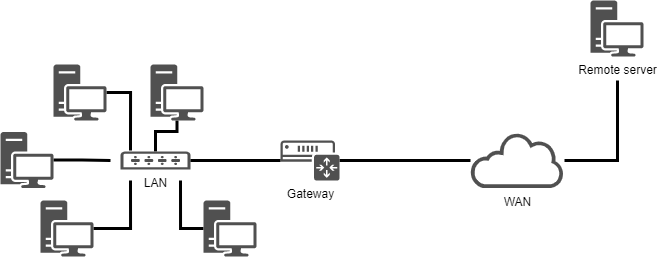
🖥 Architecture Example
Repo Server IP → 192.168.2.223
Clients → Rocky Linux 8 servers
Step 1 – Mount ISO on Repo Server
mount /dev/cdrom /mnt
Step 2 – Install Required Packages
yum install vsftpd createrepo -y
Step 3 – Copy ISO Data
mkdir -p /var/ftp/pub
cp -r /mnt/* /var/ftp/pub/
Step 4 – Create Repository Metadata
createrepo /var/ftp/pub/BaseOS
createrepo /var/ftp/pub/AppStream
Step 5 – Start FTP Service
systemctl enable vsftpd
systemctl start vsftpd
Allow firewall:
firewall-cmd --permanent --add-service=ftp
firewall-cmd --reload
Step 6 – Configure Client System
Backup old repos:
mkdir /root/backup_repo
mv /etc/yum.repos.d/* /root/backup_repo/
Create repo file:
vi /etc/yum.repos.d/rocky8-local.repo
Add:
[Rocky8-Local]
name=Rocky8-Local
baseurl=ftp://192.168.2.223/pub/
enabled=1
gpgcheck=0
Clean cache:
yum clean all
yum repolist
yum check-update
🔥 Troubleshooting – Repository Not Visible
If yum repolist shows nothing:
1️⃣ Check Network
ping 192.168.2.223
ftp 192.168.2.223
2️⃣ Check FTP Service
systemctl status vsftpd
3️⃣ Check Firewall
firewall-cmd --list-all
4️⃣ Check SELinux
getenforce
Test:
setenforce 0
5️⃣ Clear Cache
yum clean all
rm -rf /var/cache/yum
yum makecache
6️⃣ Verify Repo File
Correct format:
[Rocky8-Local]
name=Rocky8-Local
baseurl=ftp://192.168.2.223/pub/
enabled=1
gpgcheck=0
🎯 Key Takeaways – Day 6
✔ Understand RPM & DPKG
✔ Perform online patching
✔ Manage Red Hat subscriptions
✔ Configure offline ISO repository
✔ Build centralized FTP repository
✔ Troubleshoot repository issues
🙌 Conclusion
Day 6 covered complete OS patching lifecycle including:
Subscription management
Online patching
Offline patching
Enterprise FTP repository setup
Troubleshooting
This is a core production support skill for Linux Administrators.